Github Profile에 티스토리 최근 글 연동하기
2026.05.151분 읽기
Github Profile을 꾸미던 도중 티스토리 글을 연동하려고 다음과 같은 Actions를 생성했다.
.github/workflow/blog.yml
name: Latest blog post workflow
on:
  schedule:
    # 매일 자정(UTC)에 워크플로우를 실행합니다. (한국 시간 오전 9시)
    - cron: '0 0 * * *'
  workflow_dispatch:
    # GitHub Actions 탭에서 수동으로 실행할 수 있게 합니다.

# 워크플로우가 README 파일을 수정할 수 있도록 권한을 부여합니다.
permissions:
  contents: write

jobs:
  update-readme-with-blog:
    name: Update this repo's README with latest blog posts
    runs-on: ubuntu-latest
    steps:
      - name: Checkout
        uses: actions/checkout@v4
      - name: Pull in blog posts
        uses: gautamkrishnar/blog-post-workflow@v1
        with:
          # 찬희님의 티스토리 RSS 피드 주소로 변경했습니다.
          feed_list: 'https://chanhuy.tistory.com/rss'
          user_agent: 'Mozilla/5.0 (Windows NT 10.0; Win64; x64) AppleWebKit/537.36 (KHTML, like Gecko) Chrome/120.0.0.0 Safari/537.36'
티스토리 rss 주소는 'https://티스토리주소/rss'
근데 저걸 그대로 push해서 실행해 보니

무슨 406에러 RSS 주소를 체크하라느니 그러는데 Ai한테 물어보니까 봇 방지 때문에 github action으로 접근하는게 안될 수 있다고 답변을 했다.
그 이후에 ai한테 어케 해결하냐고 했더니 뭔 proxy 서버를 써서 봇 방지에 안걸리게 하라는 매우 귀찮은 짓을 하길래 구글에 따로 검색을 해봤다.
찾아보니 그냥 RSS를 파싱하는 코드를 만들고 그걸 실행시키는 Action을 통해서 하는 방식들을 이용하고 있었다.
이러면 봇 방지를 코드에서 작성하면 되기 때문에 귀찮게 Proxy까지 안써도 될 듯해서 이 방식을 택했다.
대부분 node.js를 쓰던데 잘 몰라서 python으로 구성해봤다.
제일 상단에 파일을 생성하면 된다.
update_blog.py
import urllib.request
import feedparser
import re

# 1. 티스토리 RSS 주소
url = "https://chanhuy.tistory.com/rss"

# 2. 406 에러(봇 차단) 우회를 위해 일반 브라우저처럼 User-Agent 헤더 추가
req = urllib.request.Request(url, headers={'User-Agent': 'Mozilla/5.0 (Windows NT 10.0; Win64; x64) Chrome/120.0.0.0 Safari/537.36'})
response = urllib.request.urlopen(req)
xml_data = response.read()

# 3. RSS 피드 파싱
feed = feedparser.parse(xml_data)

# 4. 최신 글 5개를 마크다운 리스트 형식으로 변환
latest_posts = ""
for entry in feed.entries[:5]:
    latest_posts += f"- [{entry.title}]({entry.link})\n"

# 5. README.md 파일 읽기
with open("README.md", "r", encoding="utf-8") as f:
    readme_text = f.read()

# 6. 정규식을 사용해 주석 사이의 내용을 새 블로그 글 목록으로 교체
readme_text = re.sub(
    r"<!-- BLOG-POST-LIST:START -->.*<!-- BLOG-POST-LIST:END -->",
    f"<!-- BLOG-POST-LIST:START -->\n{latest_posts}<!-- BLOG-POST-LIST:END -->",
    readme_text,
    flags=re.DOTALL
)

# 7. 수정된 내용을 README.md에 덮어쓰기
with open("README.md", "w", encoding="utf-8") as f:
    f.write(readme_text)
새로 생성한 action
.github/workflow /update.yml
name: Update README with Tistory

on:
  schedule:
    - cron: '0 0 * * *' # 매일 자정 실행
  workflow_dispatch: # 수동 실행 버튼 활성화

permissions:
  contents: write

jobs:
  update-readme:
    runs-on: ubuntu-latest
    steps:
      - name: Checkout Repository
        uses: actions/checkout@v4

      - name: Setup Python
        uses: actions/setup-python@v4
        with:
          python-version: '3.x'

      - name: Install feedparser
        # RSS 파싱을 위한 파이썬 라이브러리 설치
        run: pip install feedparser

      - name: Run Python Script
        # 2단계에서 작성한 파이썬 스크립트 실행
        run: python update_blog.py

      - name: Commit and Push Changes
        # 봇의 이름으로 변경된 README.md 파일을 커밋하고 푸시
        run: |
          git config --local user.name "github-actions[bot]"
          git config --local user.email "41898282+github-actions[bot]@users.noreply.github.com"
          git add README.md
          git commit -m "docs: Update Tistory blog posts" || echo "No changes to commit"
          git push
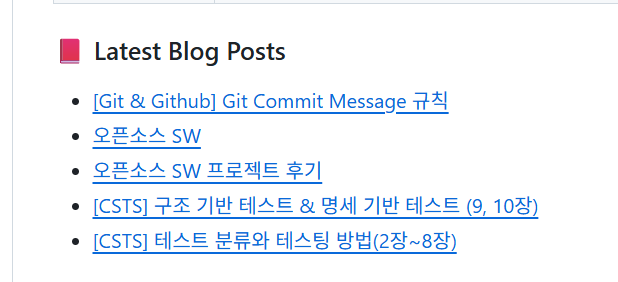
아주 잘 실행된다 ^0^